
NetMirror Free Movies & TV Streaming App
NetMirror is the beautifully designed streaming app that helps you discover trending movies & TV shows, build your watchlist, and binge seamlessly all in a gorgeous dark interface.
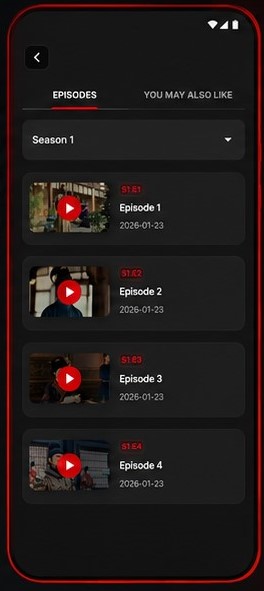
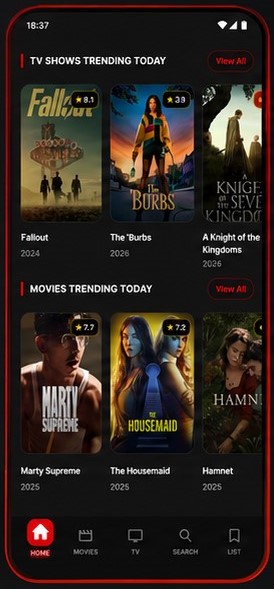
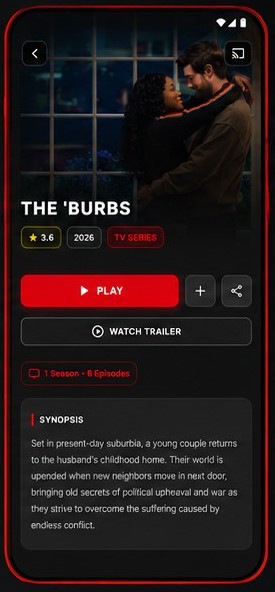
2M+
Downloads
4.8★
Average Rating
50K+
Movies & Shows
180+
Countries
Built by Streamers. Designed for Streamers.
The Problem We Faced
We were tired of jumping between five different apps just to find something good to watch. Scrolling endlessly through catalogs, forgetting what friends recommended, losing track of shows we wanted to binge — streaming had become more work than relaxation.
A Mirror for Your Taste
We built NetMirror to reflect what you actually want to watch. Instead of pushing the same mainstream titles to everyone, our app learns your preferences and surfaces hidden gems you’d never find on your own.
Obsessed with Design
Every pixel in NetMirror is designed for the late-night binge session. The dark theme is easy on your eyes, the typography is crisp on any screen, and the navigation feels natural after your first tap.
Growing Every Day
Two million downloads later, NetMirror has become the go-to streaming companion for movie lovers worldwide. Our community shapes every update — from new features to bug fixes.
Everything You Need In NetMirror
Six powerful features that make NetMirror the only streaming companion you’ll ever need.
Personalized Discover
AI-powered recommendations that learn your taste. The more you watch, the better it gets.
Rich Details & Ratings
Dive deep with synopses, cast info, trailers, ratings from IMDb & TMDB, reviews, and similar titles.
Binge Seamlessly
Smooth video playback with auto-next episode, subtitle support, quality selection, and a player for marathons.
Your Watchlist
Save movies and shows to watch later. Organize by genre, priority, or mood. Never lose track again.
Dark, Smooth & Modern
A beautifully crafted dark UI that’s easy on your eyes during late-night binges. Fluid animations.
Watch Anywhere
Works on Android phones, tablets, and Android TV. Download content for offline viewing on flights.
See NetMirror In Action
Five screens that show you why NetMirror is the most beautiful way to discover and watch content.
Discover Trending Content
Explore top TV shows and movies trending today. Our algorithm curates personalized feeds based on your viewing history, genre preferences, and what’s buzzing globally.


Rich Details for Every Title
Get everything you need to decide — detailed synopses, cast & crew info, trailers, IMDb and TMDB ratings, runtime, genre tags, and similar recommendations.
Binge Seamlessly
Our player is built for marathon sessions. Auto-play next episode, subtitle support in 50+ languages, quality switching from 480p to 4K, and picture-in-picture mode.
Benefits That Actually Matter
Stop Endless Scrolling
NetMirror’s AI learns what you love and surfaces it instantly. No more spending 30 minutes deciding what to watch.
Daily Updates
New movies and episodes added every single day.
Multi-Language
Content and subtitles available in 30+ languages.
Zero Buffering
Adaptive streaming that adjusts quality in real-time for smooth playback.
Offline Downloads
Download movies and shows to watch anywhere without internet.
Safe & Secure
No malware, no intrusive permissions, no data harvesting. NetMirror respects your privacy.
Start Watching in Three Steps
Download the APK
Tap the download button, install the APK on your Android device, and launch NetMirror. No account creation, no sign-up forms.
Discover Your Feed
Your personalized home feed loads instantly. Browse trending titles, explore by genre, or search for something specific.
Start Bingeing
Tap play and enjoy. Add titles to your watchlist, adjust quality, enable subtitles, and let auto-play keep the binge going.
A Universe of Entertainment
From Hollywood blockbusters to indie gems browse by category and find exactly what you’re in the mood for.
Movies
20K+ titles
TV Shows
15K+ series
Anime
5K+ episodes
Comedy
3K+ titles
Horror
2K+ titles
Pros & Cons
Transparency matters. Here’s an honest look at NetMirror’s strengths and current limitations.
Strengths
-
Gorgeous dark UI
Best-in-class design that’s easy on the eyes during late-night binges
-
Smart recommendations
AI that actually learns your taste — not generic popularity lists
-
Completely free to use
Full access to all features without paying a cent
-
Offline downloads
Save content for flights, commutes, or anywhere without Wi-Fi
-
No account required
Download, install, and start watching — no sign-up friction
Limitations
-
Android only for now
iOS version is in development — expected Q3 2025
-
No native smart TV app
Works via Android TV sideload; dedicated TV app is coming
-
Requires manual APK updates
Not on Google Play yet; download updates from our site
-
Watchlist doesn’t sync
Cloud sync for watchlists is on the roadmap
-
Some regional content gaps
Licensing varies by country; some titles may not be available everywhere
How to Install the APK
Simple steps to get NetMirror running on your Android device in under a minute.
Download the APK
Tap the “Download APK” button above. The file will be saved to your Downloads folder. The APK is approximately 38 MB.
Allow Unknown Sources
Go to Settings → Security → Enable “Install from unknown sources.” On Android 8+, you’ll be prompted when you open the APK.
Install the App
Open the downloaded APK file and tap “Install.” The installation takes about 5-10 seconds. Once done, tap “Open” to launch.
Start Watching
No account needed — your personalized home feed loads instantly. Browse, add to your watchlist, and hit play. That’s it!
Security Note: Only download the NetMirror APK from this official website. APKs from third-party sites may be modified and unsafe.
Broad Compatibility
NetMirror runs on virtually any Android device you own.
Android Phones
Android Tablets
Android TV
Chromecast
Safe Streaming, Zero Compromise
Your safety matters. NetMirror is built with a privacy-first approach — no shady permissions, no data harvesting, no hidden trackers. Just clean, secure entertainment.
VirusTotal Verified
Every APK release is scanned by 70+ antivirus engines and published with a clean report.
No Unnecessary Permissions
Only storage for downloads and network for streaming. No camera, no contacts, no location.
Encrypted Connections
All streaming and API calls use TLS 1.3 encryption. Your viewing habits stay private.
Open-Source Core
Core networking and security modules are open-source for independent auditing.
Download NetMirror
Free, no account needed. One APK, full access. Install in under 30 seconds.
NetMirror vs Other Apps
| Feature | NetMirror | Popcorn Time | Stremio |
|---|---|---|---|
| Modern Dark UI | |||
| AI Recommendations | |||
| Watchlist | |||
| Offline Downloads | |||
| Rich Movie Details | |||
| No Account Required |
Frequently Asked Questions
Is NetMirror really free to use?
Is it safe to install the NetMirror APK?
Why isn’t NetMirror available on the Google Play Store?
How do I update NetMirror to the latest version?
Does NetMirror work on iOS, PC, or Smart TVs?
Can I cast movies from NetMirror to my TV?
Does NetMirror require an account or registration?
What video quality does NetMirror support?
Can I download movies and shows for offline viewing?
How does the AI recommendation system work?
Loved by Movie Lovers
“This is hands down the most beautiful streaming app I’ve ever used. The dark theme is perfect for night viewing, and the recommendations are scary accurate.”
“The watchlist feature is a game-changer. I used to forget every movie recommendation — now I just add it and it’s there when I’m ready. The offline download saved me on a 14-hour flight.”
“Finally an app that doesn’t need my email, phone number, and firstborn child just to watch a movie. Downloaded, installed, watching in 30 seconds.”